Your first 5s 720p video with this model is free. No credits used.
Type a prompt or add a photo, get a 5 or 10 second Kling 4.0 MP4 in 16:9 or 9:16, at 720p or 1080p. Your first 5-second 720p video is free.
EXAMPLES
AI Video Generator Examples
Real, unedited clips from the model named under each one. Every clip shows the prompt it came from, and image to video clips show the source image in the corner.
Text to Video Examples
Prompt: A golden retriever puppy running through shallow ocean waves at sunset, splashes of water, low tracking shot, slow motion
Prompt: Aerial drone shot gliding over a neon-lit Tokyo street at night in the rain, reflections on wet asphalt, people with umbrellas
Prompt: Close-up of hot coffee being poured into a white ceramic cup on a wooden table, steam rising, warm morning light
Image to Video Examples
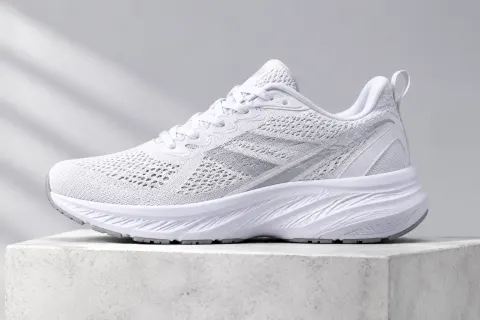
Prompt: The camera slowly orbits around the sneaker while soft light sweeps across it

Prompt: She smiles and tucks her hair behind her ear as autumn leaves drift down, gentle camera push-in

Prompt: Waves roll against the cliffs, seagulls glide across the sky, the lighthouse beam starts to turn
Kling AI Video Generator
This Kling AI video generator runs Kling 4.0 in your browser. Write what should happen, or upload a JPG, PNG or WebP image to use as the first frame, then choose 5 or 10 seconds and download an MP4. You don't need a Kling account or the Kling app, and your first 5-second 720p video costs nothing.
What Is Kling AI?
Kling is a text-to-video and image-to-video model from Kuaishou, the Chinese short-video company. Kuaishou released the first version in June 2024. Kling 4.0 is the version on this page: it turns a written scene or a still image into a short clip with moving subjects and camera motion.
The official Kling app offers Kling 4.0 clips of up to 30 seconds and more input types. Here you get the settings in the table below: a prompt or one first-frame image, 5 or 10 seconds, 16:9 or 9:16, 720p or 1080p.
Kling 4.0 Settings and Credit Cost
Credits per video on this site. Text to video and image to video cost the same.
| Length | 720p | 1080p |
|---|---|---|
| 5 seconds | 205 creditsfirst one free | 305 credits |
| 10 seconds | 410 credits | 610 credits |
Input: a prompt of up to 2,000 characters, plus an optional JPG, PNG or WebP image up to 20 MB as the first frame. Output: an MP4 in 16:9 or 9:16.
10-second and 1080p videos need a purchase first: a credit pack (from $4.99 for 500 credits) or a subscription.
How to Use Kling AI Here
Write a prompt or add a photo
Describe the subject, the action and the camera move. For image to video, your photo becomes the first frame.
Pick length, shape and resolution
Kling 4.0 is already selected. Choose 5 or 10 seconds, 16:9 or 9:16, and 720p or 1080p. The button shows the credit cost before you start.
Generate, then watch or download
Rendering usually takes a few minutes, and you can close the tab: the video is saved under Videos & credits. Downloading needs a free account.
Is Kling AI Free Here?
Yes, once. Your first Kling video at 5 seconds and 720p is free and uses no credits. After that, a 5-second 720p Kling video costs 205 credits.
- One free video per person. If you already used your free generation on another model, Kling costs credits.
- You can generate as a guest without signing up. To download, create a free account or make any purchase.
- If a video fails, its credits go back to your account automatically.
- Kling refuses some prompts and images. A refused video counts as failed, so its credits come back too.
- This is an independent site, not affiliated with Kling AI or Kuaishou.
AI Video Generator Pricing
Choose the plan that fits how many videos you make
FAQs
Kling AI Questions
Make Your First Kling Video Free
Write a prompt or add a photo in the generator above. Your first 5-second 720p Kling video costs nothing.